 Audio for Motion: Lifetime Plans Are Live: Get 20% OFF on Plus plan with Coupon - AUDIO20
  Back to blogs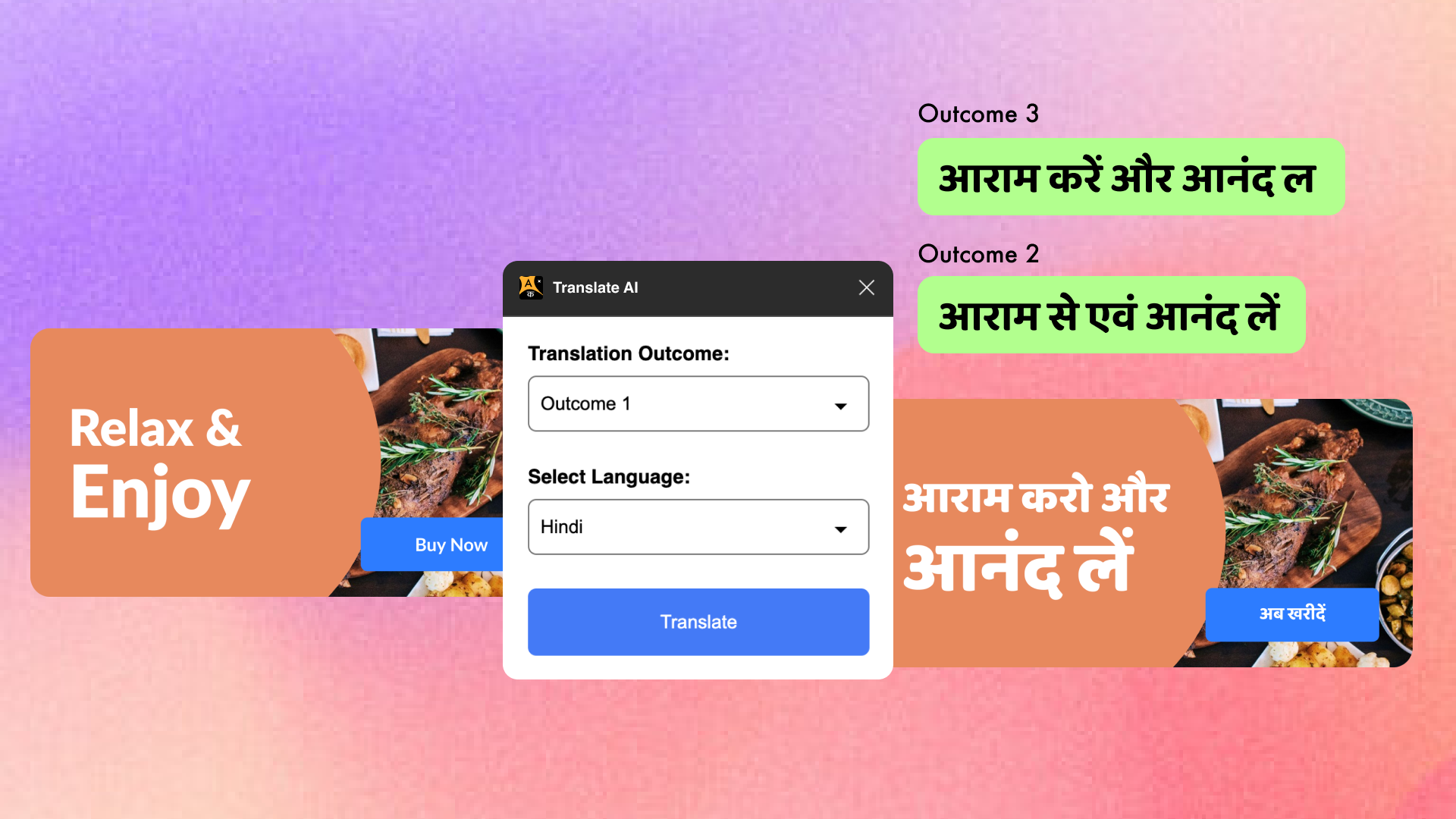
In today’s globalised world, collaboration between teams has become the norm. However, different languages can always create barriers and that’s where Crafttor’s Translate AI plugin steps in, offering a seamless solution for designers and creative professionals to translate their work effectively in umpteen languages directly within Figma. Whether you're designing for global brands or collaborating with international clients, this tool is designed to help you break down language barriers with ease.
What is the Translate AI plugin?
The Translate AI plugin is an AI-powered translation tool that integrates smoothly into your Figma workspace. It allows users to quickly and efficiently translate text elements within their designs into multiple languages. With just a few clicks, your design can speak a new language, making it easier to localise content for various markets and audiences.
This plugin is particularly useful for UI/UX designers working on multilingual interfaces, marketing teams aiming for global outreach, and anyone who needs their designs to resonate across cultures.
Key Features
Here’s why Crafttor’s Translate AI plugin is a game-changer:
1. Seamless Integration
The plugin works natively within Figma, meaning you don’t have to leave your design environment to translate content. It fits right into your workflow, saving time and effort that would otherwise be spent copying and pasting text into external translation tools.
2. Multi-language Support
With support for multiple languages, the plugin opens up new possibilities for localisation. Whether you're translating from English to Spanish, French, Hindi, or any other language, the tool ensures high-quality translations tailored to the design context.
3. Multiple Translate Outcomes
The Translate AI plugin provides 3 possible outcomes for a single line. The plugin has 3 options for outcomes, the user can select any one or can try all 3 outcomes one by one to get different translations for a single line.
4. AI-Powered Precision
Powered by cutting-edge AI, the plugin ensures accurate translations. Its machine learning models continuously evolve to provide translations that are not only precise but also contextually relevant, maintaining the tone and intent of the original content.
5. One-Click Translation
Simplify your workflow with a single click! You can translate any text layer in your Figma file in real-time without the hassle of switching between tools or disrupting your design process.
Use Cases
1. Global Brand Campaigns
When launching marketing campaigns across multiple countries, designers need to ensure that all materials are tailored to different languages. Translate AI enables fast and accurate translation, allowing teams to deploy campaigns without delay.
2. Multilingual UI/UX Design
Whether you’re building apps, websites, or platforms used by international audiences, UI/UX designers can now ensure the interface is translated accurately, creating a more inclusive user experience.
3. Client Presentations
For agencies or freelance designers who work with clients from different countries, the plugin simplifies the process of showcasing designs in the client’s native language, adding a personal touch to presentations.
How to Get Started with Translate AI
Installing and using the Translate AI plugin for Crafttor is straightforward:
-
Install the Plugin – Head to the Figma community page and find the Translate AI plugin.
-
Launch the Plugin – Once installed, access the plugin from the Figma toolbar.
-
Select the Text to Translate – Highlight the text layers you want to translate within your design.
-
Choose the Target Language – Select the language from the available options.
-
Choose the Outcome option - Select one out of 3 possible outcomes or can select all 3 one by one.
-
Apply the Translation – Watch as the plugin translates the text in real-time, right in your design!
Final Thoughts
With Crafttor’s Translate AI plugin, taking your designs to the next level by making them accessible to a global audience has never been easier. It’s a vital tool for teams aiming to break down language barriers, enhance global collaboration, and deliver designs that resonate with users worldwide. Whether you're working on a multilingual website, app, or marketing campaign, this plugin empowers your creativity to speak any language!
Integrate Translate AI into your design workflow today and experience the future of design localisation.